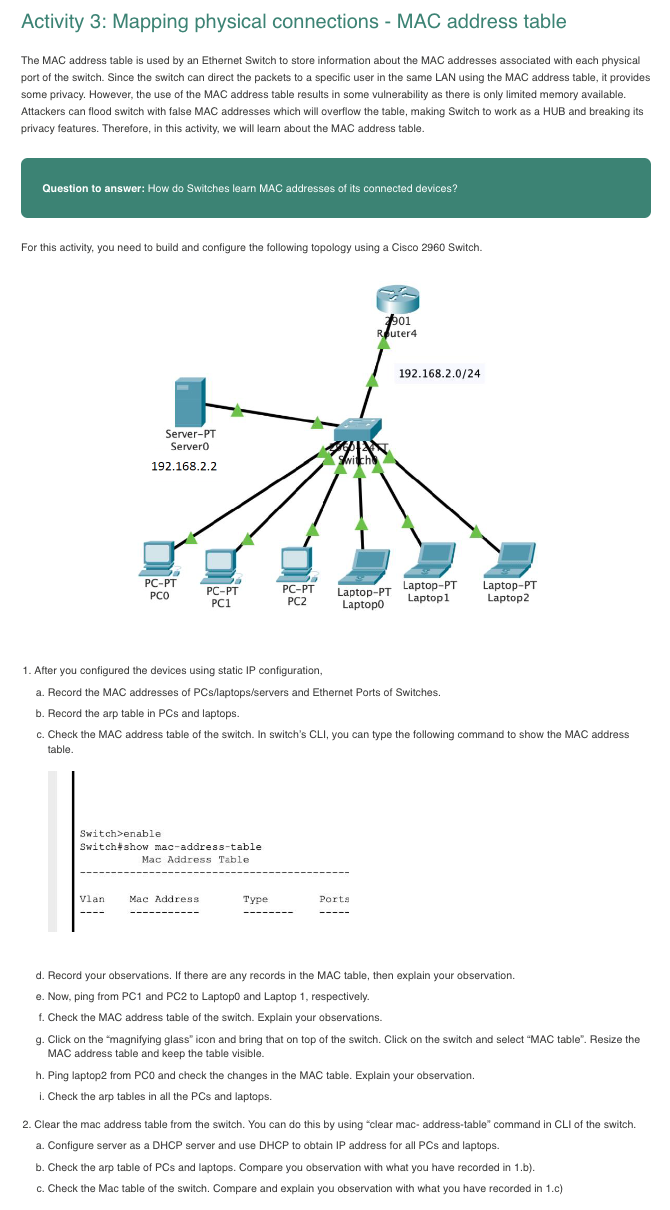
(Solved): The MAC address table is used by an Ethernet Switch to store information about the MAC addresses as ...
The MAC address table is used by an Ethernet Switch to store information about the MAC addresses associated with each physical port of the switch. Since the switch can direct the packets to a specific user in the same LAN using the MAC address table, it provides some privacy. However, the use of the MAC address table results in some vulnerability as there is only limited memory available. Attackers can flood switch with false MAC addresses which will overflow the table, making Switch to work as a HUB and breaking its privacy features. Therefore, in this activity, we will leam about the MAC address table. Question to answer: How do Switches learn MAC addresses of its connected devices? For this activity, you need to build and configure the following topology using a Cisco 2960 Switch. After you configured the devices using static IP configuration, a. Record the MAC addresses of PCs/laptops/servers and Ethernet Ports of Switches. b. Record the arp table in PCs and laptops. c. Check the MAC address table of the switch. In switch's CLI, you can type the following command to show the MAC address table. d. Record your observations. If there are any records in the MAC table, then explain your observation. e. Now, ping from PC1 and PC2 to Laptop0 and Laptop 1, respectively. f. Check the MAC address table of the switch. Explain your observations. g. Click on the "magnifying glass" icon and bring that on top of the switch. Click on the switch and select "MAC table". Resize the MAC address table and keep the table visible. h. Ping laptop2 from PCO and check the changes in the MAC table. Explain your observation. i. Check the arp tables in all the PCs and laptops. Clear the mac address table from the switch. You can do this by using "clear mac- address-table" command in CLI of the switch. a. Configure server as a DHCP server and use DHCP to obtain IP address for all PCs and laptops. b. Check the arp table of PCs and laptops. Compare you observation with what you have recorded in 1.b). c. Check the Mac table of the switch. Compare and explain you observation with what you have recorded in 1.c)